What Is a Service Blueprint?
Service blueprints help teams visualize how a service is delivered across customer touchpoints, employees, systems, and supporting processes. This guide explains the core components, when to use a blueprint, how to read one, and how to build one step by step with practical templates. It also shows how to assign ownership, examine backstage handoffs, and keep the blueprint current as the service changes.
Service Blueprint Definition
A service blueprint is a visual map of how a service is delivered. It shows what the customer does, what frontline employees do, what happens backstage, and which systems or support teams make the experience possible. G. Lynn Shostack introduced service blueprinting in the early 1980s and demonstrated the approach in her 1984 Harvard Business Review article, “Designing Services That Deliver”. The method connects customer experience with the people, evidence, and processes behind service delivery.
Its purpose is to help teams analyze how each touchpoint is supported across the organization. This makes it useful for service design, process improvement, training, and cross-functional alignment. Service blueprints are usually laid out in swimlanes so teams can separate customer actions, visible employee actions, invisible support work, and the physical or digital evidence the customer encounters along the way.
Key Components of the Service Blueprint
A service blueprint typically organizes service delivery into several horizontal lanes. The exact format can vary, but the following components provide a practical foundation.
Customer actions
This component is central to the creation of the service blueprint and therefore is laid out first. It includes the steps, actions, choices, and interactions the customer performs while evaluating, purchasing or using the service delivery process. These actions are displayed chronologically across the top of the blueprint.
Onstage/visible contact employee actions
These are the actions and interactions that customers can see or otherwise experience. They may involve employees, self-service interfaces, chat, emails, notifications, or other visible parts of the service.
Backstage/invisible contact employee actions
These are actions performed behind the scenes to support the visible experience. They may be completed by frontline employees, operations teams, or systems, but the work itself is not visible to the customer.
Support processes
Support processes are the internal activities, services, policies, systems, and partner contributions that enable frontstage and backstage work. They often reveal dependencies across functions that are not visible to customers.
Physical evidence
Evidence represents what customers encounter at each touchpoint. It can be physical or digital, such as a location, sign, product, website, form, receipt, email, or notification. Evidence is often placed above the corresponding customer action.
Lines
Lines separate the blueprint’s layers. The line of interaction marks direct interactions between the customer and the organization, whether through an employee or technology. These touchpoints may become important moments in how the customer evaluates the service.
Then comes the line of visibility. All components that come above this line are visible to the customer while the ones that come below it are invisible.
The line of internal interaction separates customer-facing or contact activities from internal support processes. Vertical connectors can show dependencies and handoffs between lanes. Define any additional notation in a legend so readers interpret it consistently.
Arrows
Arrows show sequence, flow, or dependencies. Some conventions use a single arrow for one-way movement and a double arrow for mutual dependence or agreement, but teams should define the notation they use in a legend.
Secondary elements you can include in a service blueprint are:
Time: If time is an essential part of your service, you can use a timeline to represent the estimated time duration for each step of the process.
Emotions: Similar to the way a customer journey map reveals the emotions customers go through during each step of their journey, you can indicate the various emotional states your employees are in during each step of the service delivery process.
Metrics: You can also include success metrics in your service blueprint to track the progress toward your goals.
When to Make a Service Blueprint
A service blueprint is most useful when you need to understand or improve how a service works from both the customer and operational points of view. It is especially effective when you are:
- designing a new service and need to visualize the full delivery model before launch
- improving an existing service that feels slow, inconsistent, or confusing
- aligning cross-functional teams such as operations, support, product, and technology
- identifying where customer pain points connect to backstage process issues
- preparing for automation, system replacement, or digital transformation
- onboarding teams that need a shared reference for how the service actually works
How to Make a Service Blueprint
The act of building a service blueprint is often as valuable as the finished diagram because it forces teams to compare assumptions, surface hidden dependencies, and agree on how the service really works. The process usually involves a cross-functional group from operations, support, product, marketing, and any other team that influences service delivery.
Let’s look at the process step by step.
Step 1: Identify the service process to be blueprinted
Start by choosing one service journey or subprocess to map. A narrow scope makes the blueprint easier to complete and more useful for decision-making. Define why you are creating the blueprint in the first place: to improve speed, reduce errors, clarify ownership, redesign the experience, or support a larger transformation initiative.
Step 2: Identify the customer segment
Different customer segments may experience the same service in different ways, so define which customer group the blueprint represents. Once that is clear, list the customer actions, decisions, and touchpoints that happen across the journey. A lightweight customer journey map can be a useful input here because it helps you capture the visible experience before you map the operational layers behind it.
Step 3: Map onstage and backstage actions
Next, map the employee actions that happen in front of the customer and the ones that happen behind the scenes. Interview frontline teams, operations teams, and system owners so the blueprint reflects the real workflow instead of the idealized version.
If technology plays a major role in service delivery, include the system actions or prompts that shape the customer experience.
Step 4: Link contact activities to needed support functions
Map the support processes, internal teams, and systems that enable the contact activities above them. These may include approvals, data entry, billing workflows, fulfillment steps, or technical systems that customers never see directly.
Once the support functions are identified, link them to the visible service actions so it is clear where customer outcomes depend on backstage work.
Step 5: Add physical evidence of service at each customer action step
Finally, add the physical evidence to the map. This highlights what the customer sees or receives as tangible evidence of the service during each step of their experience.
Step 6: Fine-tune and share
In the final step, add any extra detail that will help people act on the blueprint, such as time indicators, success metrics, failure points, ownership notes, or emotional highs and lows in the journey.
Review the blueprint with the people who perform and support the service, resolve disagreements with evidence, and record an owner and review trigger. Share it with relevant stakeholders using access settings appropriate to the operational and customer information it contains.
How Creately Helps You Build Better Service Blueprints
Creately helps teams build and maintain service blueprints as shared visual process documentation. Map the service flow, owners, systems, and handoffs; connect relevant guidance; and use collaboration features to review changes in context. Keep authoritative approvals, customer records, and sensitive operational data in the systems required by your organization.
Draft a Service Blueprint with Creately AI
Use a plain-language description to generate a first-pass diagram, then adapt the AI service blueprint template to the service you are studying. Treat AI output as a draft: verify the customer journey, frontstage and backstage work, support processes, systems, and exceptions with customers and the teams involved.
This helps you:
- Skip the blank canvas struggle
- Rapidly prototype or brainstorm service ideas
- Establish a structure that the team can validate and refine
Smart templates and industry-ready examples
Creately offers editable service blueprint templates and examples for different service contexts. Use them as starting structures, then replace assumptions with evidence from the customer journey and actual operational workflow.
Use templates to:
- Match industry-specific workflows
- Learn by example
- Get alignment quickly across teams
Intuitive drag-and-drop interface
Creately’s visual workspace lets teams arrange shapes, swimlanes, and connectors on a flexible canvas. Use layout and formatting controls to make lanes, dependencies, and exceptions easier to follow as the blueprint grows.
What this means:
- Less time spent on layout
- More consistent spacing and structure
- Smooth updates and iterations
Keep Supporting Context Connected
Add notes, links, images, and supporting files to relevant elements so readers can understand policies, definitions, evidence, or instructions without overcrowding the diagram.
This makes your service blueprint:
- More than a static visual—it’s a working reference
- A shared visual reference that process owners can maintain
- Supporting context connected to the relevant service step
Real-time collaboration and commenting
Multiple people can edit the blueprint together in real time, leave comments, and use @mentions to bring the right stakeholder into the discussion. Process owners can incorporate agreed updates while formal approvals and action records remain in the appropriate systems.
Ideal for:
- Cross-functional service design teams
- Workshops and planning sessions
- Gathering feedback quickly and clearly
Easy sharing and presentation tools
Share the workspace with appropriate access settings, export service blueprints as PDF, PNG, JPEG, or SVG, or use Presentation Mode to guide stakeholders through the flow.
How to Read the Service Blueprint
A service blueprint can be read in multiple ways. In this section, we will show you how to read and understand them for different purposes.
To understand the customers’ view of the process or of their experience; read the service blueprint from left to right while tracking the elements in the customer action category. You can understand the view of the customer by focusing on how they initiate the service, the choices they make, how involved they are in creating the service, the physical evidence of the service from their point of view and whether the evidence is consistent with the strategy and positioning of the evidence.
To understand the role of the contact employees; read the diagram horizontally focusing on the activities that are directly above and below the line of visibility. Here you can look into how effective and efficient the process is, who interacts with the customer and how often they do so and whether there is one or several people to deal with a customer.
To understand how the various elements of the service process are integrated; Here you need to analyze the blueprint vertically. This analysis will help you identify which employees and which tasks are essential to effectively deliver the service to customers. Focus on what actions are performed backstage to assist the critical customer interaction points, what the supporting actions are, and how the handoffs between employees are taking place.
To redesign the service process; Here you can analyze the service blueprint as a whole. By doing so you can understand its complexity, how it can be changed and how changes in the customer’s point of view may affect the contact employee actions and internal processes. You can also use the blueprint to evaluate inefficiencies and failure points and identify opportunities for improvement and redesign.
Common Service Blueprint Mistakes
Before moving into tools and templates, watch for a few common issues:
- mapping too much scope at once instead of one service journey or scenario
- skipping customer research and relying only on internal assumptions
- documenting the happy path without failures, delays, or exceptions
- forgetting the systems, policies, or support teams that enable frontstage work
- treating the blueprint as a workshop artifact instead of a working reference
Benefits of a Service Blueprint
A service blueprint can help teams:
- Connect experience to operations: Trace customer touchpoints to the employees, systems, policies, and processes that enable them.
- Find dependencies and failure points: Reveal backstage handoffs, delays, duplicated work, and exceptions that may affect service delivery.
- Align cross-functional teams: Give customer-facing and operational teams a shared view of the same service.
- Design and test improvements: Compare current-state and proposed service models, surface assumptions, and identify questions for research or pilots.
- Clarify ownership: Record who maintains each part of the service and who should review changes.
- Support onboarding and continuous improvement: Use the blueprint as living process documentation, updating it when the service, systems, or responsibilities change.
A blueprint improves visibility, but it does not prove that a proposed change will improve customer outcomes. Validate important decisions with research, operational evidence, experiments, and appropriate service metrics.
Service Blueprint Templates
These ready-to-use service blueprint templates help you get started quickly. Whether you’re mapping customer journeys or backend processes, each template is fully customizable and based on real examples. Pick one that fits your needs or use the AI-powered option to create your own.
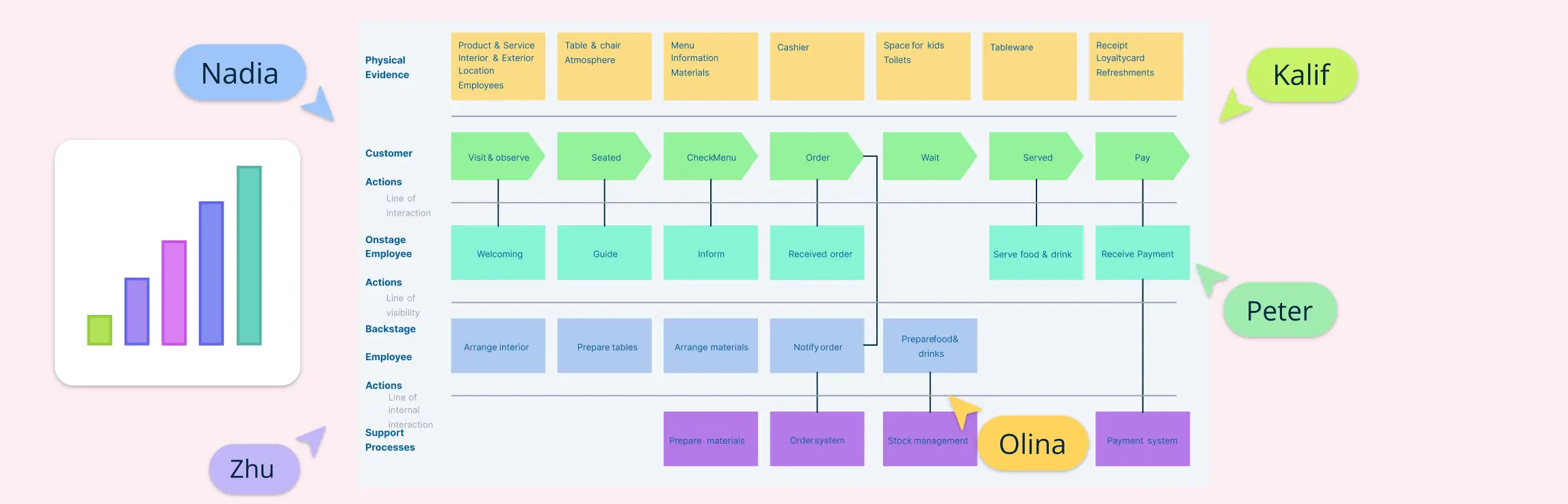
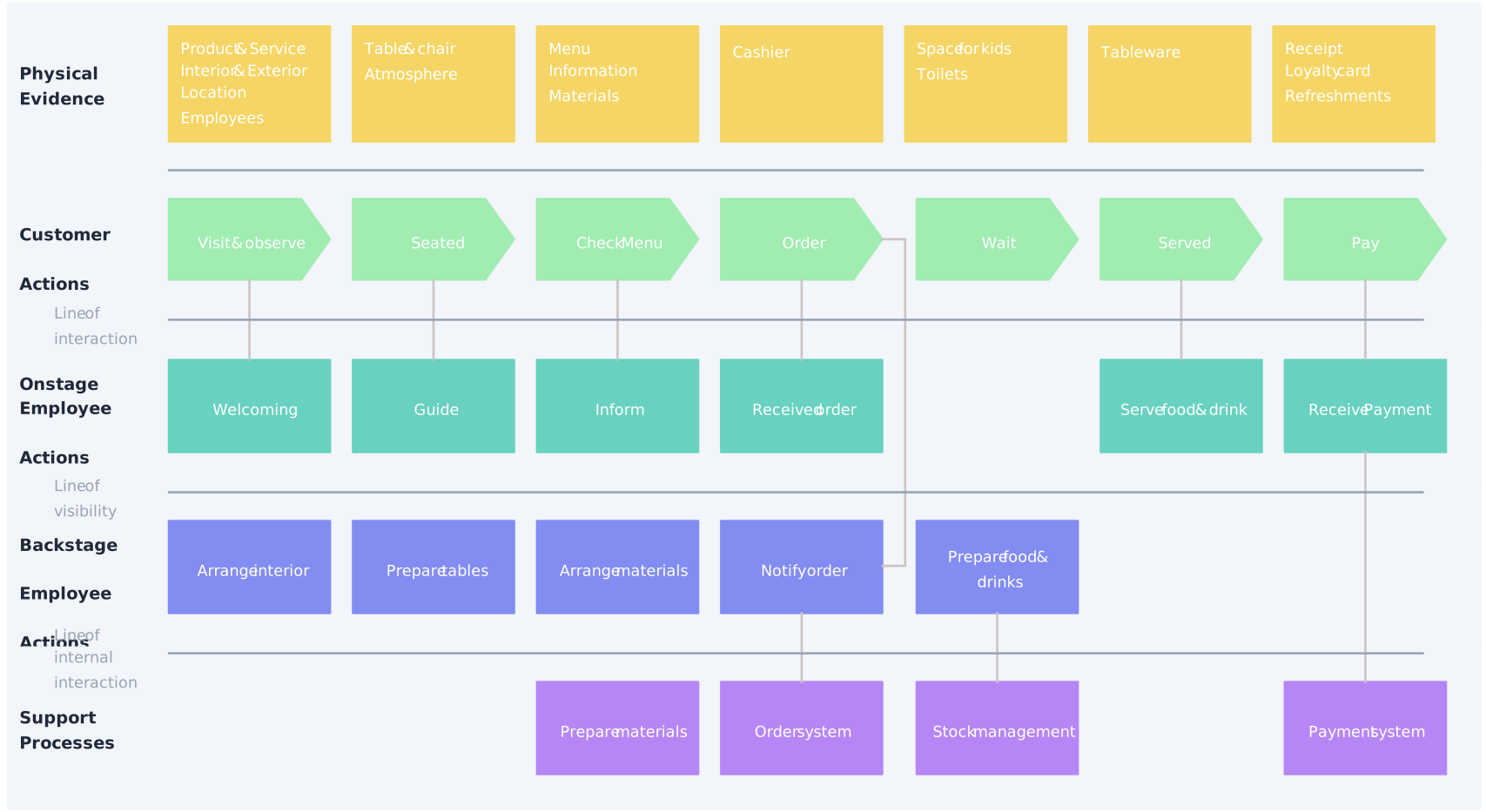
Restaurant Service Blueprint

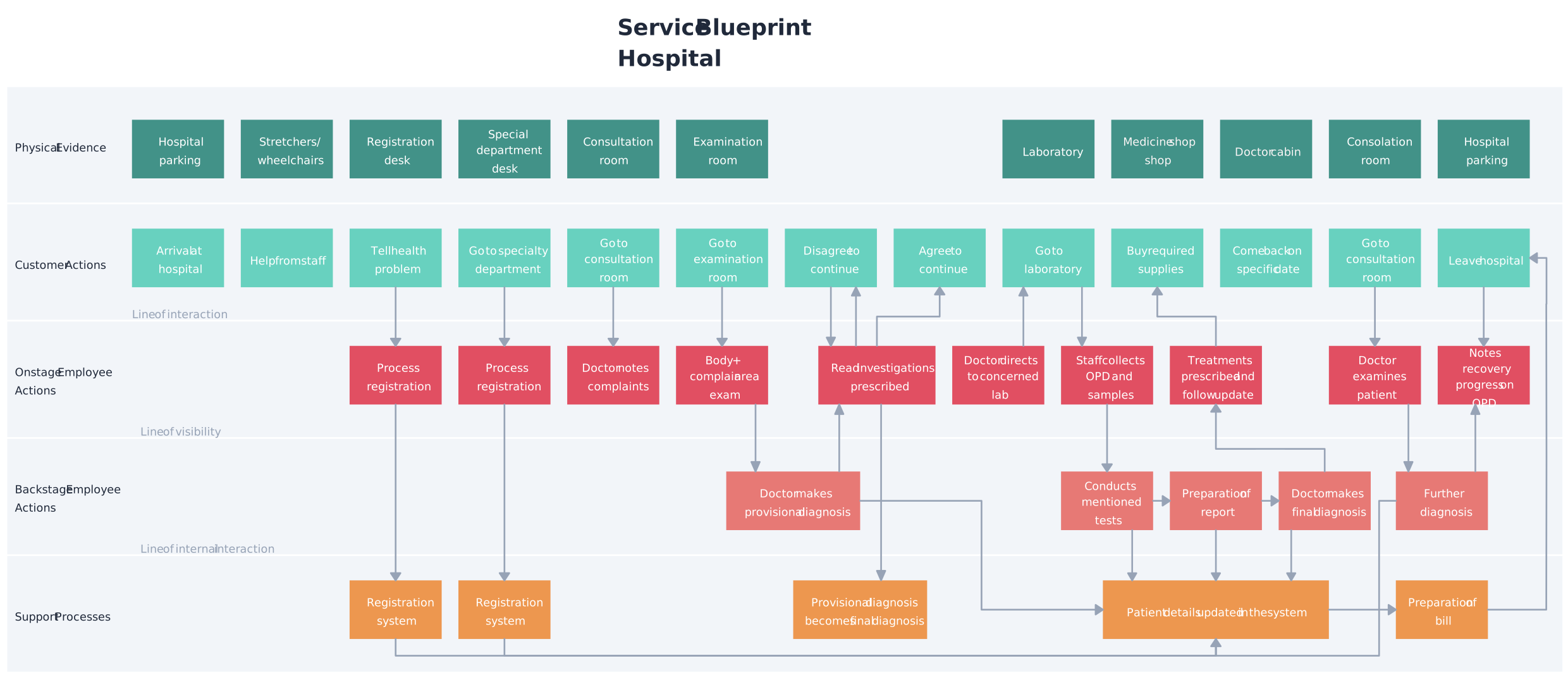
Hospital Service Blueprint
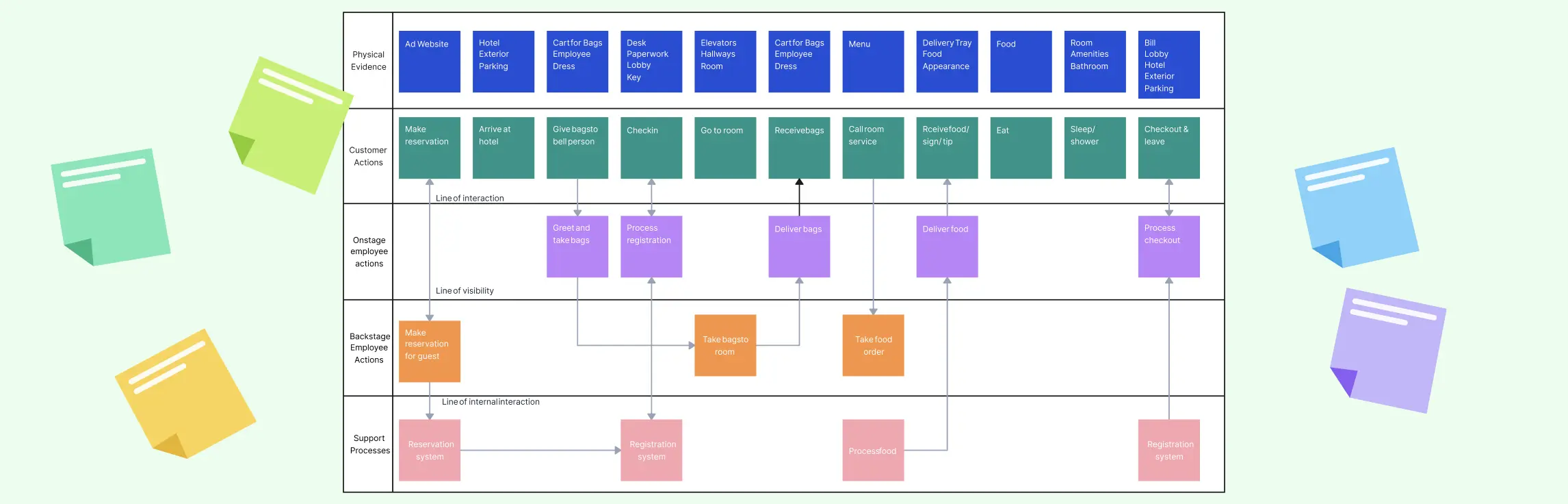
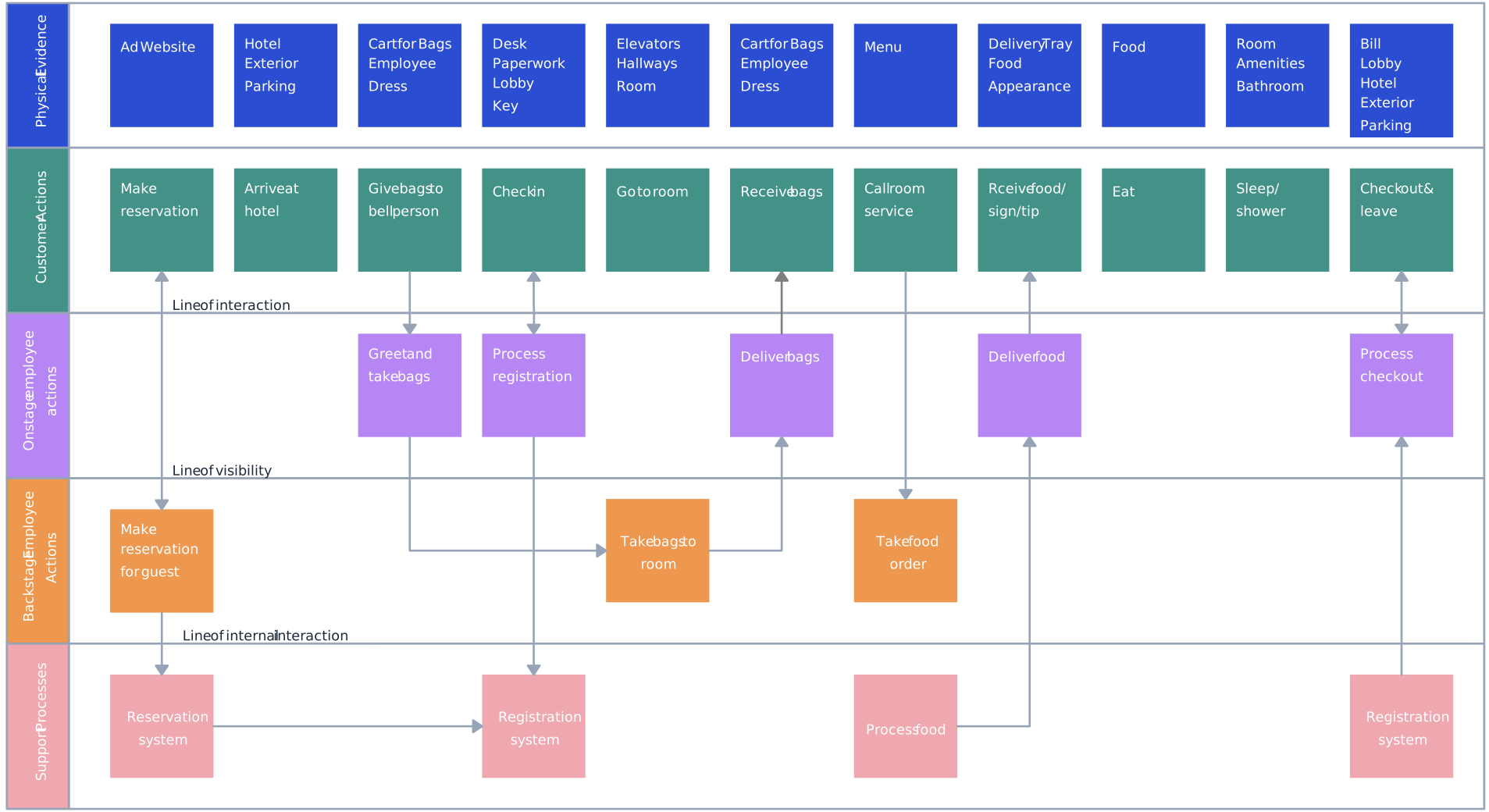
Hotel Service Blueprint
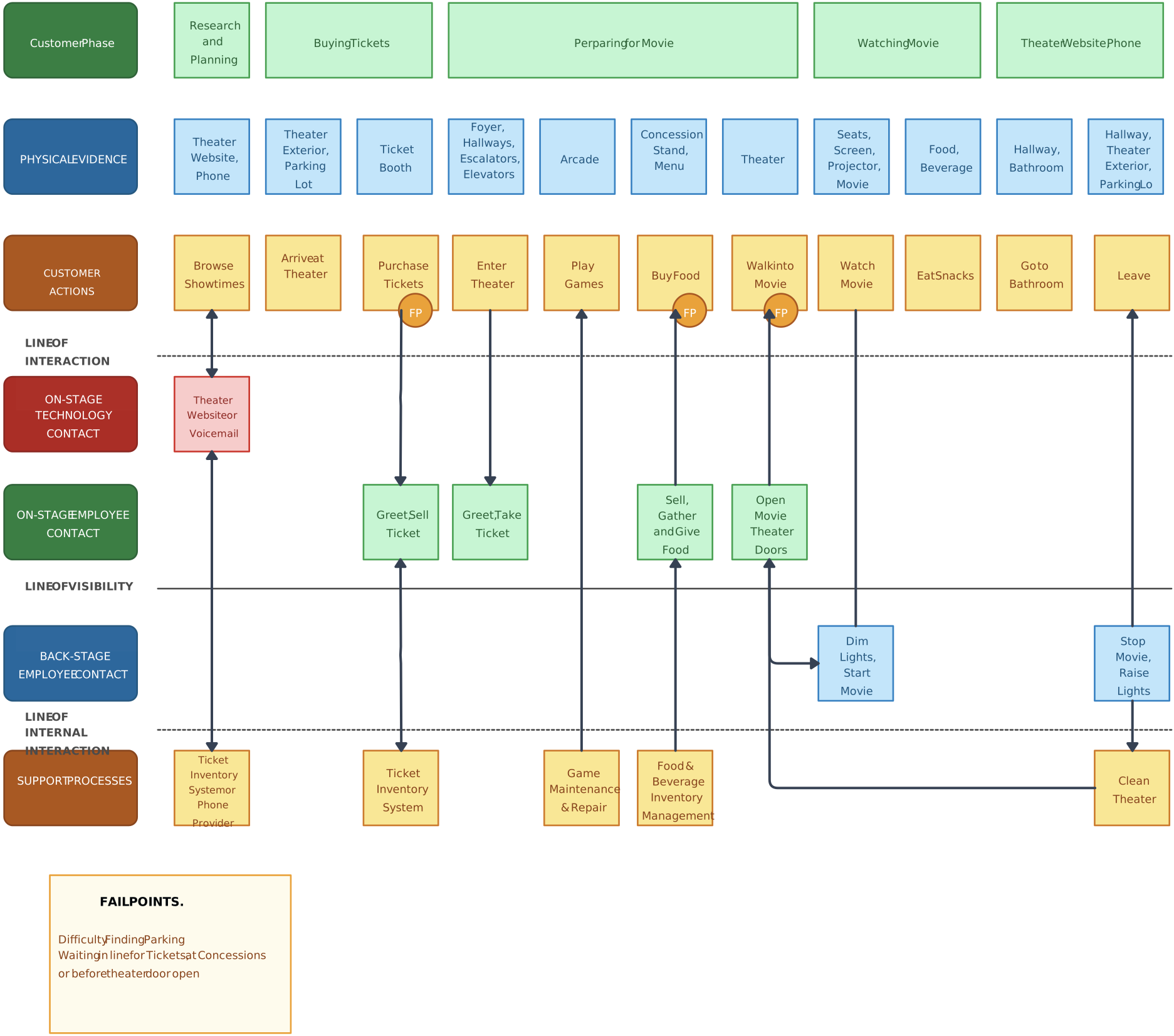
Movie Theater Service Blueprint
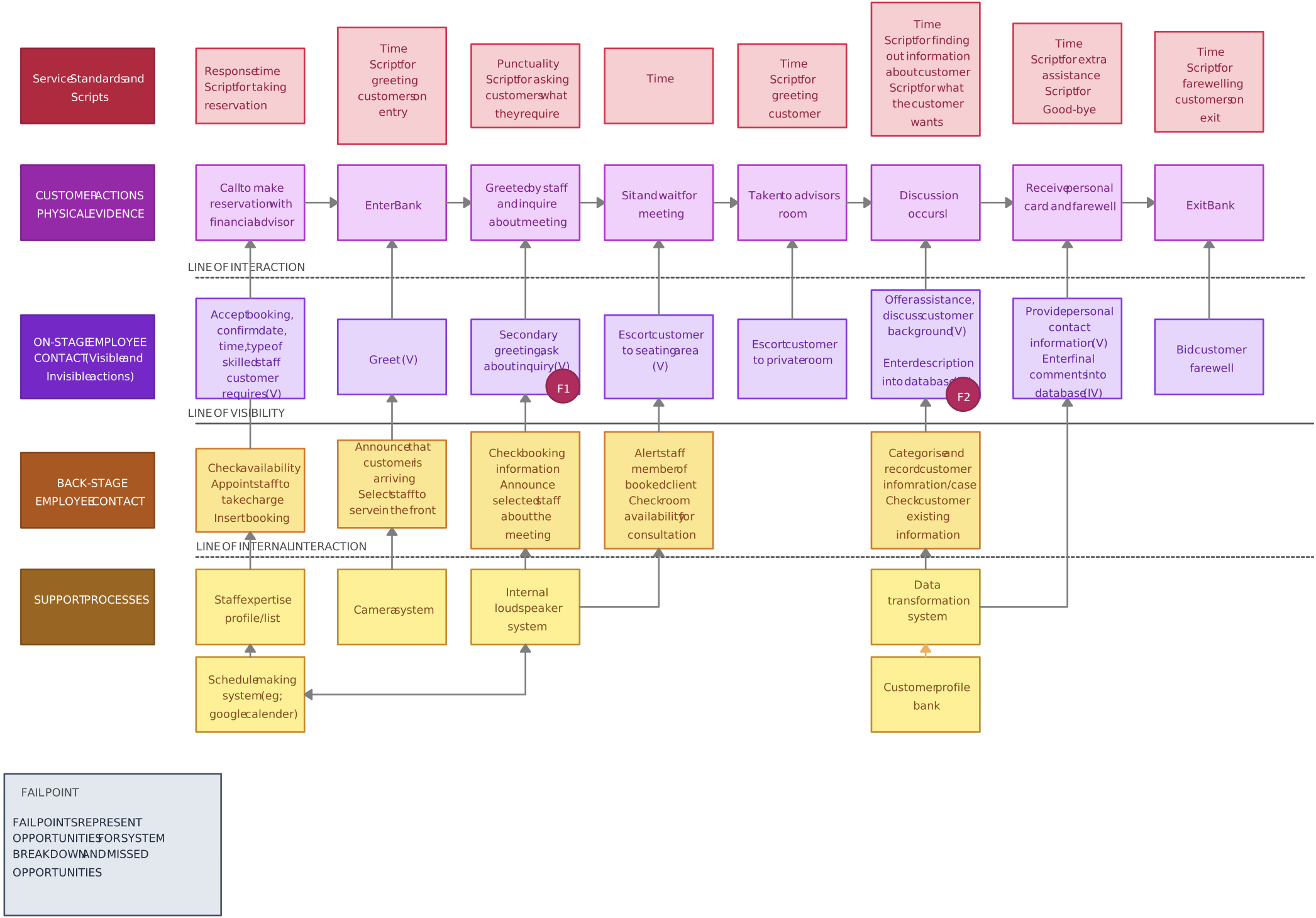
Commonwealth Bank Service Blueprint
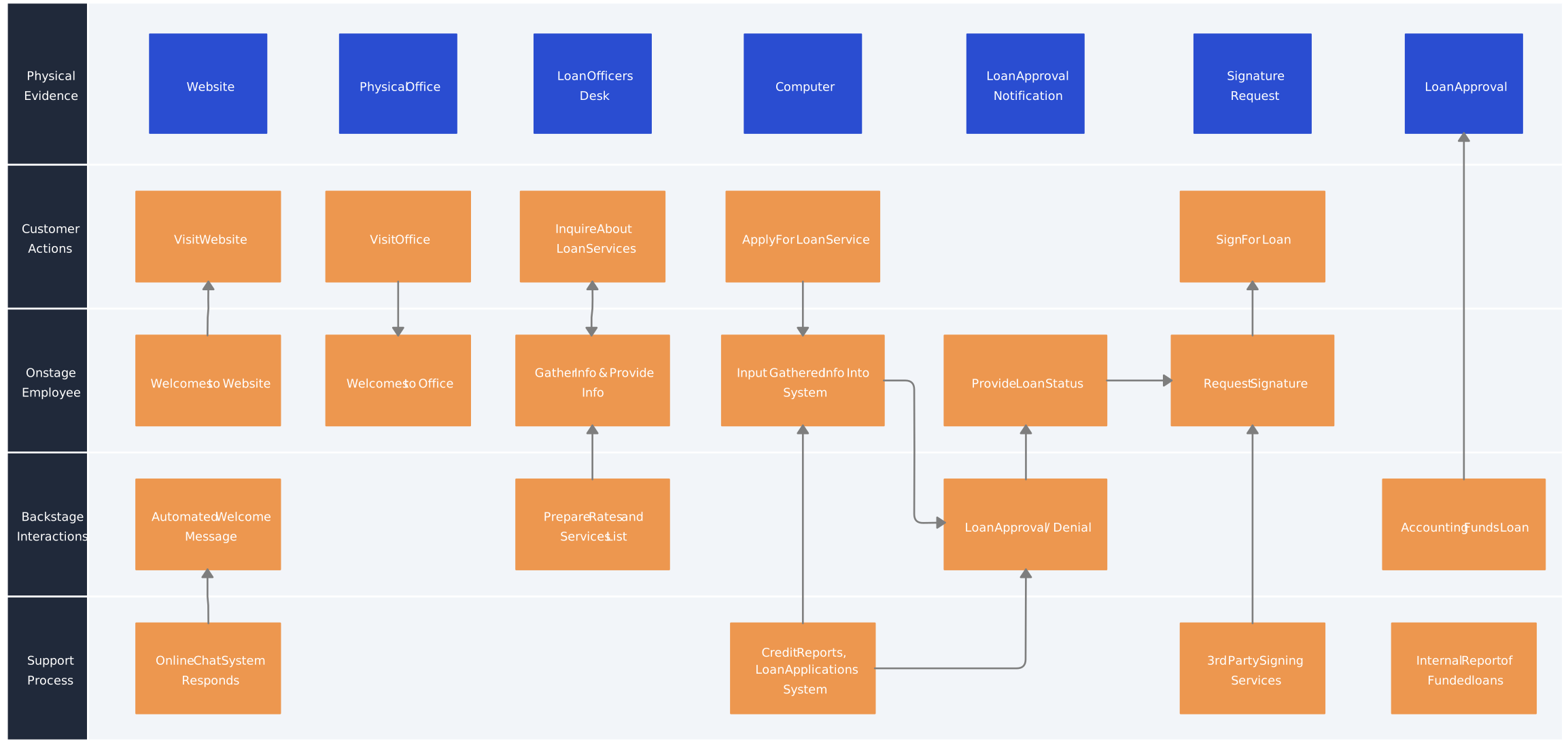
Finance Industry Service Blueprint
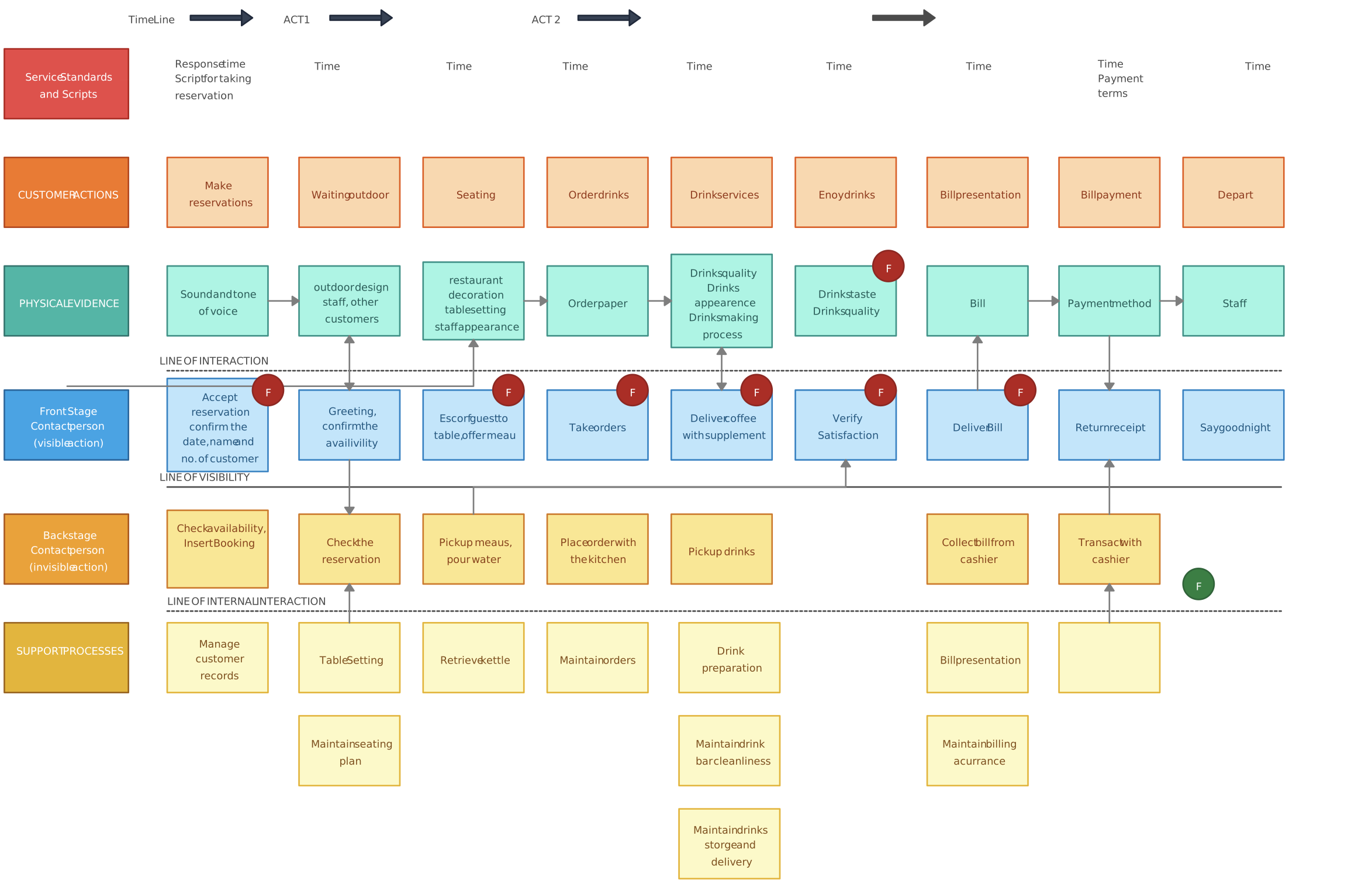
Service Blueprint for a Coffee Shop
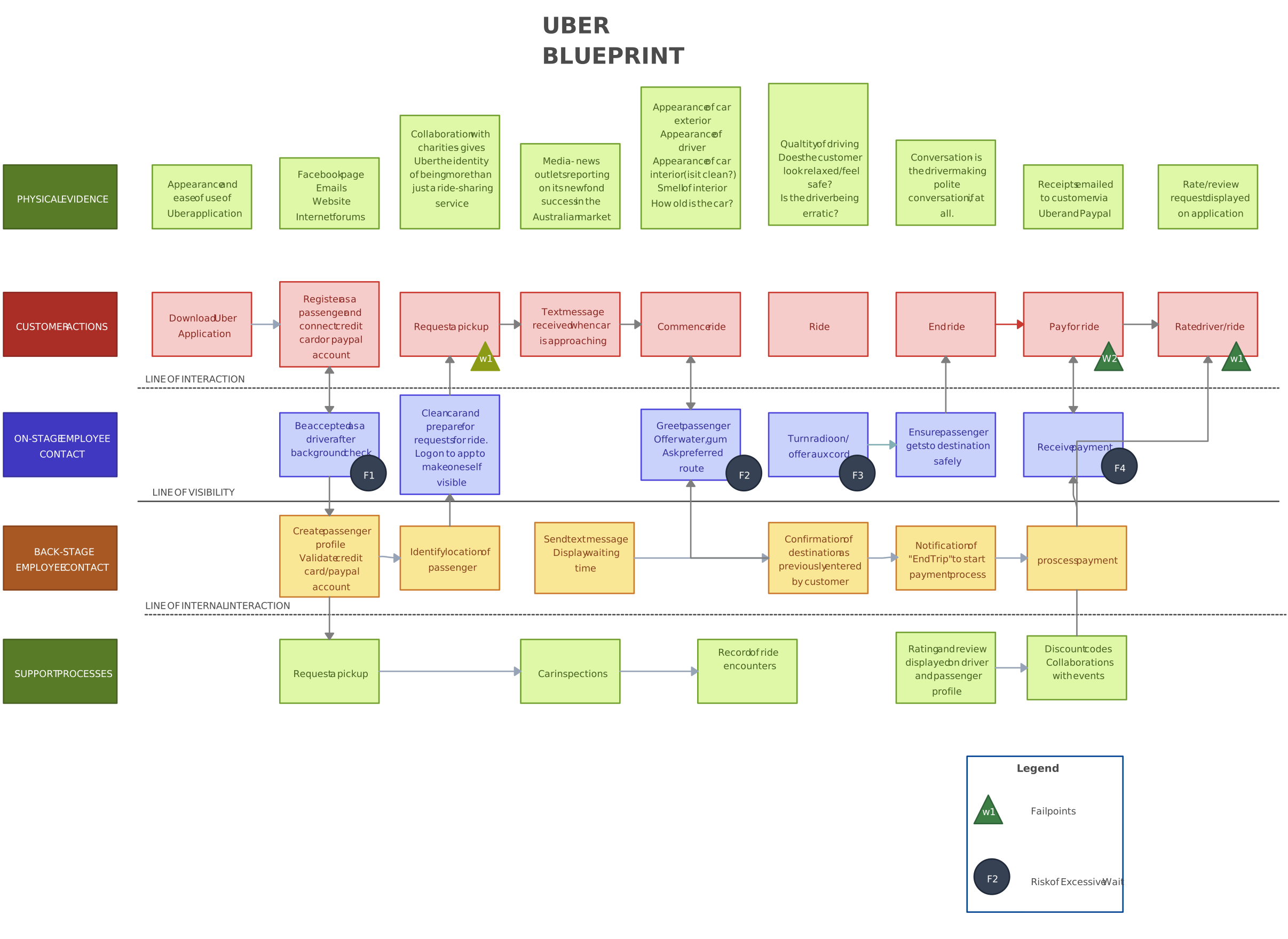
Uber Service Blueprint Example
Ready to Create Your Own Service Blueprint?
Start with one customer journey and a clearly defined purpose. Map the visible experience first, then add backstage work, support processes, systems, evidence, owners, handoffs, and failure points. Validate the blueprint with customers and service teams, and assign responsibility for keeping it current.
Use Creately’s service blueprint templates to create a first version and refine it collaboratively.
FAQs About Service Blueprints
How can service blueprints help identify and improve customer touchpoints?
How can service blueprints contribute to service innovation and new service development?
Are there any limitations or challenges in using service blueprints?
What’s the difference between a service blueprint and a customer journey map?
How can organizations effectively implement and maintain service blueprints?
Are there any best practices or tips for creating impactful service blueprints?
What are the common applications of a service blueprint?
References
Kostopoulos, G., Gounaris, S. and Boukis, A. (2012). Service blueprinting effectiveness: drivers of success. Managing Service Quality: An International Journal, [online] 22(6), pp.580–591. doi:https://doi.org/10.1108/09604521211287552.
Abugeddida, R.A. and Donnellan, P. (2021). Service Blueprint Technique for Designing and Improving Service: A Literature Review. [online] doi:https://doi.org/10.13140/RG.2.2.16423.88482.
Hossain, M.Z., Enam, F. and Farhana, S. (2017). Service Blueprint a Tool for Enhancing Service Quality in Restaurant Business. American Journal of Industrial and Business Management, 07(07), pp.919–926. doi:https://doi.org/10.4236/ajibm.2017.77065.