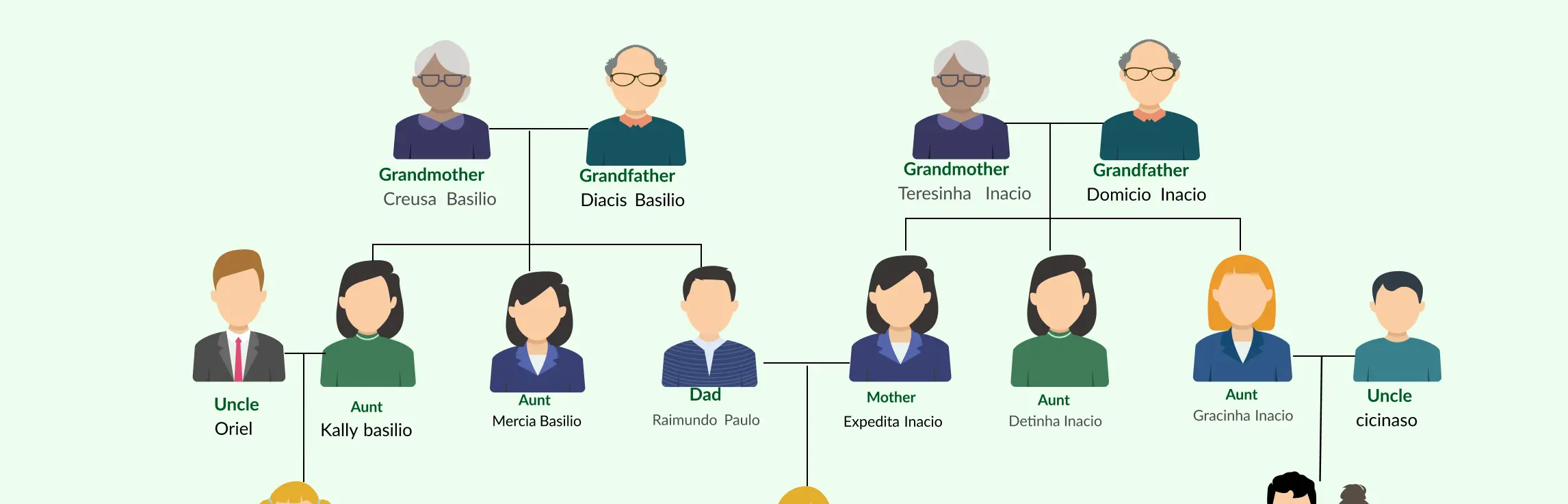
Ever tried tracing your family history only to end up with a tangle of names, dates, and scattered notes that make your head spin? That’s where family tree software comes in, transforming a chaotic jumble of facts into a clear, organized, and interactive family tree that’s easy to explore and share.
A Quick Overview of the Best Family Tree Tools
To help you quickly compare the top family tree software, this table breaks down each tool against key criteria like ease of use, customization, collaboration, and scalability, so you can see at a glance which app fits your needs best.
| Criterion | Creately | Miro | LucidChart | GenoPro | SmartDraw |
| Ease of Use / Usability | 4.5 / 5 | 4.5 / 5 | 4.5 / 5 | 3.5 / 5 | 4 / 5 |
| Template / Shape Library (for family‑trees / genograms) | 4.5 / 5 | 4 / 5 | 4 / 5 | 5 / 5 | 4 / 5 |
| Customization & Visual Style / Layout Control | 4.5 / 5 | 4 / 5 | 4 / 5 | 4 / 5 | 4 / 5 |
| Collaboration & Shared / Real‑time Editing | 5 / 5 | 5 / 5 | 5 / 5 | 2 / 5 | 3 / 5 |
| Data & Record‑Keeping (Member Details, Media, Notes) | 4 / 5 | 3 / 5 | 3.5 / 5 | 5 / 5 | 3.5 / 5 |
| Export / Sharing Options | 4 / 5 | 4 / 5 | 4 / 5 | 4 / 5 | 4 / 5 |
| Handling Complex / Large Family Trees (Scalability) | 3.5 / 5 | 3 / 5 | 3.5 / 5 | 5 / 5 | 3.5 / 5 |
| Overall Flexibility (for simple to advanced use cases) | 4.5 / 5 | 4 / 5 | 4 / 5 | 4.5 / 5 | 4 / 5 |
| Overall Rating (average) | 4.4 / 5 | 4.1 / 5 | 4.2 / 5 | 4.3 / 5 | 4.0 / 5 |
| Best For | Visual & collaborative family trees, shared/elaborate genograms | Teams / families building & collaborating online, flexible visual maps | Users needing browser‑based charts with good collaboration; general diagrams + family trees | Detailed, large-scale genealogies with rich data & complex relationships | Users wanting quick, tidy family trees, with office‑tool integration and general diagram flexibility |
What to Look for When Choosing a Family Tree Software
Choosing the right family tree software can feel overwhelming, after all, not all tools are created equal. To make your review meaningful, it helps to evaluate each app based on key criteria that truly affect the user experience. Here’s what we focused on when reviewing the best family tree software:
1. Ease of Use
A family tree app should make building and navigating your tree simple, even if you’re a beginner. Look for intuitive interfaces, drag‑and‑drop editing, and clear visualization of relationships.
2. Feature Set
The best software offers more than just names and dates. We checked for features like:
- Multimedia support (photos, documents, videos)
- Customizable charts and reports
- Source citation management
- Timeline views and interactive navigation
3. Platform Compatibility
Whether you use Windows, macOS, or mobile devices, the software should support your ecosystem. Cloud syncing or mobile apps are a bonus for on-the-go access.
4. Data Management & Portability
Exporting, importing, or sharing your tree should be seamless. Support for standard formats ensures your data isn’t trapped in a proprietary system.
5. Collaboration & Sharing
Some family tree software lets multiple users contribute, which is perfect for families working together. Collaboration tools, privacy controls, and shareable online trees were important factors in our review.
6. Pricing & Value
We compared free versus paid versions, one-time licenses versus subscriptions, and the value offered relative to features. The goal was to identify tools that fit different budgets without compromising quality.
7. Advanced Capabilities
For serious genealogists, features like smart matching, historical record integration, DNA testing, or handling complex family structures (adoptions, multiple marriages, same-sex partnerships) can be game changers.
By assessing software through these criteria, you get a clear picture of which apps will meet your needs, whether you’re just mapping your immediate family or uncovering generations of history.
1. Creately
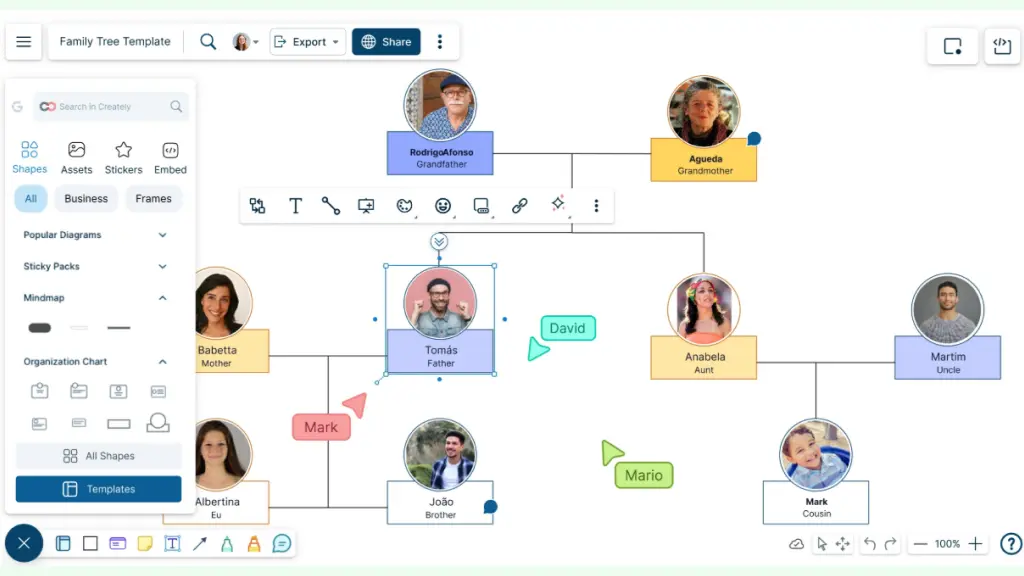
Creately is a visual workspace and diagramming tool that makes it easy to map out complex ideas, including detailed family trees, using an intuitive interface and ready-made templates. Designed for both beginners and advanced users, it brings real-time collaboration, flexible customization, and smart formatting tools together in one place, so you can build, edit, and share your family tree without the usual clutter or confusion.
Key Features for Family Trees
Intuitive and Easy‑to‑Use Interface: Creately offers a drag‑and‑drop canvas and simple diagramming tools that let you build family trees without needing design or coding skills, great for beginners or casual users. The interface stays clean and manageable even when working with complex trees, which lowers the barrier for anyone trying to visualize family relationships.
Template Library: Creately provides ready‑made family‑tree templates (and other diagram types), so you don’t have to start from scratch. This helps you get up and running fast, ideal if you want to create a neat genealogy chart quickly.
Comprehensive Shape Libraries: The platform includes a broad set of shapes suitable for genograms, family charts, and custom node types, letting you represent extended or non‑traditional family relationships easily. You can use specialized “person” shapes with fields for extra data (notes, attachments, media), supporting richer profiles beyond just names.
Easy Customization Options: Colors, themes, layout formatting, and shape styling are customizable, so you can tailor the look of your family tree to match your preference or branding. Also, auto‑layout and formatting options help keep large or branching trees organized and readable without manual tweaking every time you add a new member.
Online Collaboration for Teams / Family: Since Creately is cloud‑based, multiple people (e.g. family members) can work on the tree together, with real-time collaboration, comments, @‑mentions, and live cursors to coordinate edits. This makes it easy to build or expand a shared family tree as a group rather than depending on a single person.
Export to Common Formats: Once your tree is ready, you can export it as PNG or JPEG (and PDF/SVG if you’re on a premium plan), useful for printing, sharing, or archiving. You can export either the full workspace or selected sections/shapes, giving flexibility for partial exports (e.g. one branch of a large family).
Integrations: Creately supports integrations with tools like Google Drive/Google Workspace and Microsoft 365, which can help if you want to link documents or media (e.g. scanned records, photos) to your family tree workspace. This makes it easier to centralize genealogy research and supporting documents without bouncing between multiple apps.
Visual Quality & Style: The diagrams you create with Creately look clean and professional, suitable for presentation, printing, or sharing with family and friends. Combined with customization and formatting tools, it’s possible to design visually appealing family trees that go beyond plain text‑based charts.
Smart Connectors: Creately offers preset connectors that automatically align and link shapes, which helps when constructing relationship lines between family members without manual drawing, handy for complex or multi‑branch trees. As you rearrange nodes, connectors adjust, helping maintain clarity as you expand or restructure the tree.
Version History / Revision Tracking: Creately supports version history (allowing you to track changes, revert to past versions) when collaborating or iterating on your tree, useful to avoid losing data or mistakenly overriding information. This gives peace of mind especially when multiple people are editing a shared family tree concurrently.
Linked Documentation / Data‑Linked Visuals: Through its database‑linked canvas, Creately lets you attach photos/images, notes, documents, media or other metadata to individual family‑member nodes, effectively turning a tree into a mini knowledge hub, not just a static chart. You can embed things like Google Docs/Sheets, images, or PDFs directly into the workspace for deeper context, ideal for storing family records, stories, or supporting documents with the tree.
Pros
- Very beginner‑friendly: easy drag‑and‑drop interface and pre-made templates let even non-technical users build family trees quickly.
- Rich shape library + customization & styling options, gives flexibility to represent complex relationships and design aesthetic trees.
- Collaboration support, ideal for families working together or groups compiling extended genealogies.
- Export and sharing options, good for printing, sharing with relatives, or embedding trees in presentations or documents.
- Ability to attach detailed data (photos, notes, documents) to each family member, so the family tree doubles as a central research repository, not just a chart.
- Cloud‑based with integrations, convenient access, data centralization, and embedding of external documents/workflows.
Cons / Limitations
- Since Creately is now web‑based only (desktop apps phased out), offline work is not natively supported, you need an internet connection.
- The free plan offers limited export formats and fewer collaboration features; advanced features (PDF/SVG export, larger storage, unlimited diagrams) may require paid subscription.
- For extremely large or deeply nested genealogies, performance or organization might become tricky (though Creately claims infinite canvas, extremely large trees may still become unwieldy).
- While integrations exist, some users say integrations are more limited compared to fully dedicated genealogy‑software ecosystems.
Pricing*
- Free - $ 0
- Personal - $ 5 /month per user
- Business - $ 89 / month paid annually for unlimited users
- Enterprise - Custom pricing
*Pricing as of November 2025
Why Creately is a Great Fit for Building Family Trees
Creately is best suited for small to medium family trees, collaborative genealogy projects, or visually-oriented charts for sharing and presentation. If you just want a clean, shareable, and easy-to-build family tree (or working with family/friends to build it), Creately delivers strong value.
2. Miro
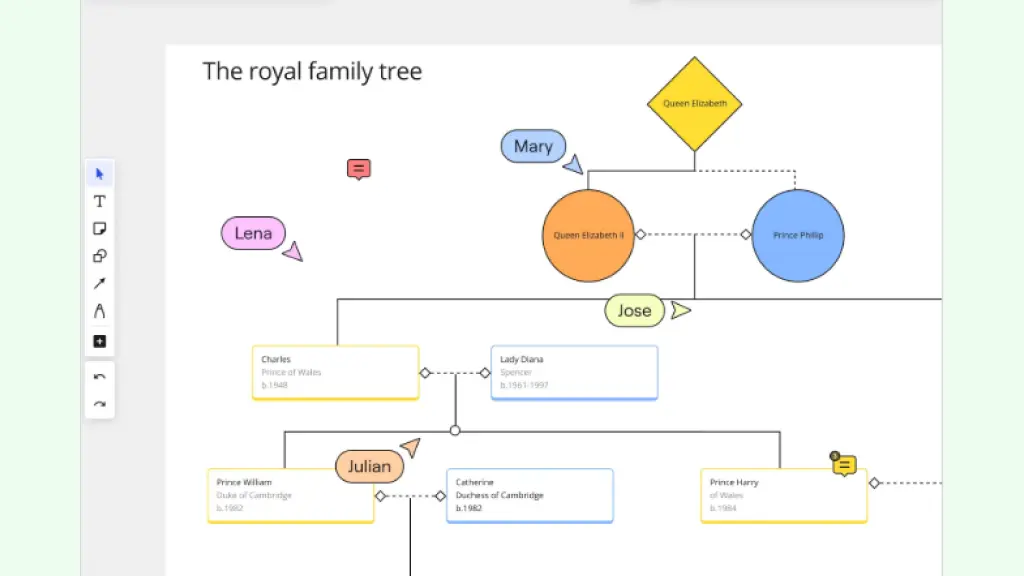
Miro is a cloud-based visual collaboration and whiteboard platform built around an “infinite canvas,” designed to help teams, and individuals, map ideas, structures, and relationships in a flexible, visual workspace. It supports free-form diagramming, drag-and-drop shapes, sticky notes, images/media, and a broad template library, making it easy to transform tangled information (like family history) into clearly structured diagrams.
Key Features for Family Tree Mapping
- Infinite Canvas & Flexible Diagramming: Miro’s unlimited canvas gives you room to build large, sprawling family trees without worrying about space constraints, you can expand outward across generations or add multiple branches as needed. With a robust toolbox of shapes, lines/connectors, text, images, and media attachments, users can custom-draw relationships, add photos, dates or notes for each person, giving a richer, more detailed family map.
- Template Library & Pre-Built Family Tree Templates: Miro offers ready-made templates, including family-tree / pedigree / kinship templates, that help you start quickly instead of building everything from scratch. These templates can be customized in layout, styling, and content, making them adaptable whether you’re mapping a simple nuclear family or a complex multi-generation lineage.
- Real-Time Collaboration & Sharing: Because Miro is online and supports multiple users on a board at once, you can collaborate with family members, letting everyone contribute names, photos, corrections or additional branches together in real time or asynchronously. You can also export or share the board (image, PDF, etc.), which makes it easier to distribute or archive a family tree for relatives or printing.
Pros
- Great flexibility, the infinite canvas and rich shape/media toolkit give you virtually unlimited creative freedom to map simple or complex family trees.
- Quick start, pre-built templates make it easy to begin immediately, without having to design layout or connectors from zero.
- Collaboration-friendly, ideal for family projects, allowing multiple people to contribute and refine the tree together.
- Multimedia support, you can embed photos, documents, notes (birth dates, stories), making the tree far more than a text-only chart.
- Easy sharing/export, good for sharing digitally or printing a family tree for keepsakes or family gatherings.
Cons / Limitations
- The open canvas and many options can feel overwhelming if you just want a simple tree, some users may find the infinite possibilities confusing or heavy.
- With very large or complex trees (many generations, many members), performance can lag and organizing everything cleanly becomes more laborious.
- As a general visual whiteboard (not specialized genealogy software), Miro lacks built-in genealogical features like relationship data management, source citations, or GEDCOM import/export, so you trade depth of genealogy-specific features for flexibility.
- Requires internet / cloud, offline editing or full local control may not be available or optimal.
Pricing*
- Free Plan: $0
- Starter: $8 per member/month (billed annually)
- Business: $16 per member/month (billed annually)
- Enterprise: Custom pricing
*Pricing as of November 2025
Verdict
Miro is an excellent option for individuals or families who want to build visual, flexible, shareable family trees, especially if you value collaboration, customization, and ease-of-use over deep genealogical database features. It shines when you’re creating medium-sized family diagrams, want to collaborate with relatives, or turn your family tree into a rich visual presentation with photos, media, and notes.
However, if you’re undertaking large-scale genealogical research with hundreds of individuals, need structured data, source management, or genealogical-standard exports, a dedicated genealogy application might be more suitable. Miro offers freedom and visual power, but more structure-specific genealogy tools will offer more specialized features for deep ancestral work.
3. Lucidchart
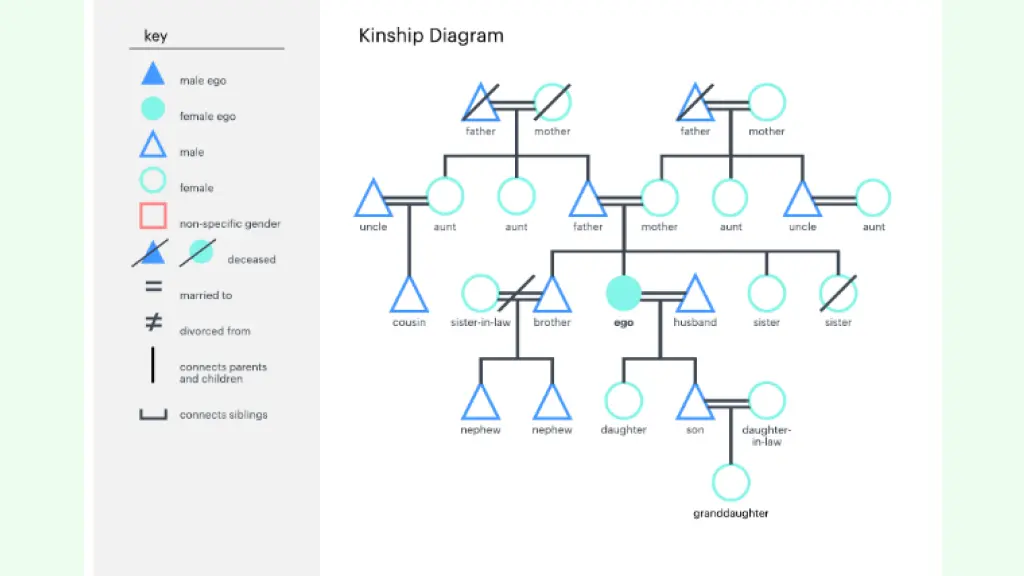
Lucidchart is a cloud-based diagramming and visual collaboration tool that runs in the browser and lets users build flowcharts, org charts, mind maps, ER diagrams, and yes, family trees, using an intuitive drag-and-drop interface, a large shape/template library, and real-time co-authoring so teams or families can collaborate together seamlessly.
Key Features for Family Tree Mapping
- Drag-and-Drop Diagramming + Large Shape & Template Library: Lucidchart gives you access to hundreds of professionally designed templates and a broad library of shapes, making it easy to start a family tree from a template or build one from scratch without worrying about designing every node or connector yourself.
- Real-Time Collaboration & Sharing: Because Lucidchart is browser-based and supports simultaneous editing, comments, and shared access controls, family members or collaborators can work together, adding, editing or refining the tree together in real time or asynchronously.
- Data-Linking, Auto-layout & Export Options: You can attach data to shapes (names, dates, notes), use auto-layout/smart formatting to keep the tree tidy, and export the final diagram to common formats (like image or PDF), making sharing, printing, or archiving your family tree straightforward.
Pros
- Very easy to use for beginners, drag-and-drop interface and ready templates make starting a family tree fast and intuitive.
- Real-time collaboration lets multiple people (e.g. family members) contribute and refine the tree together from anywhere.
- Ability to add data, notes, images to individual members/nodes, so the tree can serve as a richer genealogy chart, not just a diagram.
- Auto-layout and flexible formatting help keep even moderately complex trees organized and readable.
- Convenient export and sharing options (image, PDF, web link), useful for printing or sharing with relatives.
Cons / Limitations
- Because Lucidchart is web-based, heavy or very large diagrams (many generations, many members) can sometimes lead to lag or performance issues.
- The free version is rather limited, for serious or expansive family trees, you’ll likely need a paid plan to unlock full functionality, more shapes, and fewer restrictions.
- As a general-purpose diagramming tool (not a dedicated genealogy app), Lucidchart lacks some advanced genealogy features, e.g. importing/exporting standard genealogy formats (like GEDCOM), source-record management, or built-in support for complex family relationships (e.g. adoptions, multiple marriages), so data isn’t as structured as in specialized genealogy software.
Pricing*
- Free Plan
- Individual: $9/month
- Team: $10/user/month
- Enterprise: Custom pricing
*Pricing as of November 2025
Verdict
Lucidchart is a strong and practical choice if you want to build a clean, visually appealing, and shareable family tree quickly, especially with collaborators. It shines when you care about presentation quality, ease of use, and flexibility, and when you don’t necessarily need the deep genealogical data-management features of dedicated genealogy apps. For many users, especially those constructing small- to medium-sized family trees, working with family members, or creating a shareable family history chart, Lucidchart offers a solid balance of usability and visual quality.
If in the future you plan to expand the tree into a large, multi-generational genealogy with many data points, detailed records, and source tracking, you might want to pair Lucidchart with a dedicated genealogy tool, or consider such a tool instead, because Lucidchart’s strength is in visualization and collaboration, not data-centric genealogy tracking.
4. GenoPro
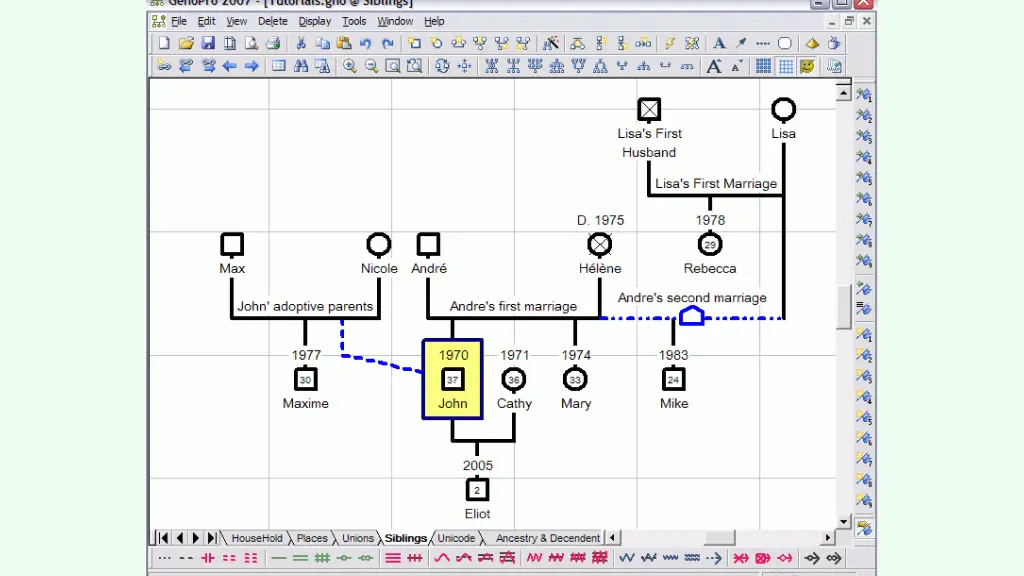
GenoPro is a genealogy and genogram‑creation software for Windows built specifically to help users map out detailed family trees, including complex, non‑traditional family structures, while also allowing rich data entry per individual (photos, personal history, medical data, etc.).
It presents a complete graphical pedigree view (ancestors + descendants) and supports extensive customization, making it a strong choice both for casual family historians and for professionals dealing with medical, social, or psychological genograms.
Key Features for Family Tree Mapping
Graphical Pedigree + Full‑Tree View: GenoPro lets you display your entire family tree at once, ancestors and descendants, rather than restricting you to just a direct‑line chart. This helps especially when dealing with large or complex families, giving a “big picture” overview while still allowing drill-down into branches.
Rich Data Fields & Multimedia Support: Beyond names and dates, GenoPro allows you to attach photos, contact info, occupation/education history, medical records (health, diseases), and even custom tags to each individual or family unit, transforming a bare‑bones tree into a detailed family record database.
Genogram & Relationship‑Type Support (Not Just Biological Lines): The software supports complex relationships: multiple marriages, divorces, adoptions, same‑sex partnerships, step‑ and half‑siblings, and more. It also supports “emotional / social relationships”, letting you chart friendships, conflicts, divorces or emotional ties, which is useful for genograms rather than just ancestry charts.
Scalability & Structured Data Handling: GenoPro is built to handle very large trees, tens or even hundreds of thousands of individuals, with support for sub‑trees that hyperlink to each other for easier navigation. Its object‑oriented database ensures hierarchical/circular relationships and avoids data redundancy, which is important for complex or deeply connected genealogies.
Reports, Export & GEDCOM Support: You can generate detailed reports (HTML, interactive SVG, print-ready, photo albums, timelines, etc.), and export or import using the standard GEDCOM format, which helps with data portability between genealogy tools.
Pros
- Very powerful for complex or large family trees, including non-traditional and extended relationships.
- Allows rich profiles, photos, dates, occupations, medical history or social relationships, beyond just names/links, making it a robust database for family history or research.
- Supports genograms and emotional/medical/social relationships, useful for professionals (therapists, social workers) or anyone tracking more than just ancestry.
- Can handle very large datasets without collapsing, with sub‑trees, hyperlink navigation, and efficient data structure.
- Offers strong export/reporting capabilities, including GEDCOM support, HTML/SVG maps, and print‑ready formats.
Cons / Limitations
- GenoPro is Windows-only (though it can run under compatibility layers like Wine), which limits accessibility for macOS or Linux users.
- Interface and visuals feel somewhat dated compared to modern web-based or cloud diagram tools, for users accustomed to sleek UIs, GenoPro can seem old‑school.
- There’s a learning curve, especially when dealing with advanced features like medical‑history panels, custom tags, or very large trees. Making the tree visually tidy and readable often requires manual layout work rather than automated prettiness.
- No built-in real-time collaboration, unlike cloud diagram tools, sharing or co‑editing requires manual file sharing, which can be cumbersome for collaborative family projects.
Pricing*
- Individual: $49
- Academic: $395
- Enterprise: $1795
*Pricing as of November 2025
Verdict
For anyone who wants more than a simple visual, especially if you’re building a large, detailed, or complex family tree / genogram, GenoPro remains one of the most powerful and flexible tools on the market. Its strength lies not just in drawing pedigrees, but in capturing rich data, multiple relationship types, and large-scale genealogies, making it ideal for genealogists, social workers, therapists, or anyone interested in deep family history and analysis.
If you need a quick, collaborative, visually elegant tree for sharing with relatives, a diagramming tool might feel more user‑friendly. But if your goal is comprehensive documentation, depth, and data-driven genealogy, GenoPro is among the best choices, even if you need to invest a little time learning its interface.
5. SmartDraw
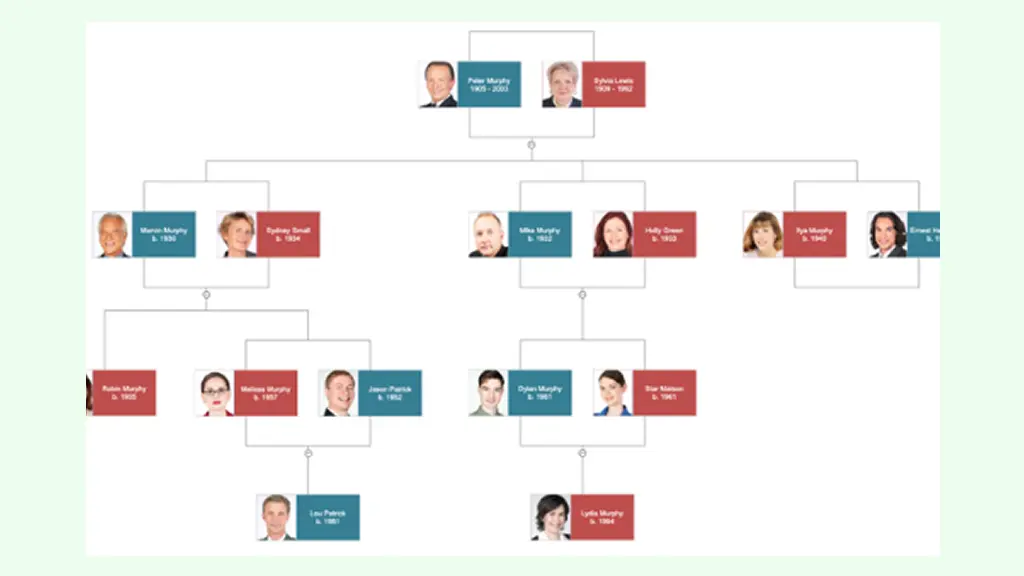
SmartDraw is a versatile online (and desktop/windows‑version) diagramming and charting application that supports everything from flowcharts and org charts to floor plans, mind maps, and notably, family trees. It comes with a broad template library, smart formatting controls, and integration options, making it a practical choice for anyone who wants to turn a messy set of family connections into a neat, visual family‑tree chart.
Key Features for Family Tree Mapping
Built‑in Family Tree Templates & Automatic Structure Tools: SmartDraw provides ready‑made family‑tree (and genealogy) templates as a starting point. Once you choose a template, you can use simple commands to add descendants, spouses, siblings or ancestors, and SmartDraw automatically draws and connects the boxes, keeping the tree properly structured.
Drag-and-Drop Interface with Smart Formatting / Auto‑Alignment: The interface is designed to be intuitive: shapes, boxes, and connectors snap into place, lines stay aligned, and layout remains neat, even as you expand the tree. You don’t need to manually draw or adjust every connector, SmartDraw handles much of the visual heavy lifting.
Integration with Office Suites + Export and Share Options: SmartDraw integrates with common productivity tools like Microsoft Office and Google Workspace, useful if you want to embed the family tree into a document, a presentation, or a shared file. Also, once the tree is ready, you can export it in standard formats (PDF, PNG, JPG) for sharing, printing, or archiving.
Pros
- Easy to get started, the ready templates and automatic connectors let even beginners build a family tree without needing design or genealogy expertise.
- Clean, professional-looking diagrams, the auto-alignment and formatting tools help ensure the family tree remains easy to read and visually neat, even as it grows.
- Flexible integration and export, good if you want to embed the tree in a document, presentation or share with relatives, colleagues, or across teams.
- Multi-purpose, because SmartDraw supports many diagram types (flowcharts, org charts, floor plans, etc.), it’s useful beyond just family trees, good if you also want mind maps or other diagrams in your genealogy/work toolkit.
Cons / Limitations
- Cost, SmartDraw can be relatively expensive compared to simpler or free tools, especially if you only need it occasionally.
- For very large or complex family trees (many generations, many branches), performance and usability may suffer, the auto‑formatting helps, but very big diagrams can become cumbersome.
- As a general-purpose diagram tool, SmartDraw lacks some genealogy‑specific features, e.g. built-in support for complex relationship types (adoptions, half‑siblings, step‑families), source citation management, or genealogical data export/import (like GEDCOM).
- Cloud-based or licensing model, if you rely on the online version or rented license, losing subscription or connectivity may restrict access to your own work (some user reports mention difficulties accessing diagrams after license expiration).
Pricing*
- Individual: $7.95/month
- Team: $6.65/user/month
- Enterprise: Custom pricing
*Pricing as of November 2025
Verdict
SmartDraw offers a balanced, user‑friendly visual solution for people who want to craft clean, presentable family trees without diving into the complexity of dedicated genealogy software. Its strengths lie in simplicity, quick setup, neat presentation, and integration with everyday office tools, which makes it an excellent choice for small‑ to medium‑sized family trees, one-off genealogical projects, or for creating shareable charts and diagrams to include in documents or presentations.
However, if you aim to build a large, multi‑generation genealogy with complex relationships, detailed records, or genealogical data management, you might find SmartDraw too basic. In that case, using a dedicated genealogy tool (with data‑centric features) will likely serve you better.
SmartDraw is best for users who value visual clarity and ease over genealogical depth, a practical compromise between design flexibility and charting convenience.
Wrapping Up: Choosing the Best Family Tree Software
At a Glance
After comparing the top family tree software across ease of use, templates, customization, collaboration, data management, and scalability, here’s a quick snapshot of which tool works best for different needs:
Best Overall: Creately – Combines intuitive editing, extensive family-tree templates and shape libraries, smart connectors, real-time collaboration, and flexible export options, making it the most versatile choice.
Best for Collaboration: Creately / Miro – Ideal for families or teams who want live co-editing, commenting, and flexible visual mapping across multiple devices.
Best for Detailed Genealogy: GenoPro – Perfect for large, complex family trees or professional genograms, with support for rich data, multiple relationship types, and large-scale trees.
Best for Quick, Clean Trees: Creately / SmartDraw – Great for creating visually neat, shareable family trees quickly, with built-in templates and smart formatting tools.
Best Free / Flexible Starter Option: Creately / Miro (Free Plan) – Offer a flexible infinite canvas and templates to start building your tree without cost.
Selecting the right family tree software depends on your goals, family size, and collaboration needs. If you want a flexible, visually appealing, and collaborative tool, Creately stands out as the top choice for most users. For teams or families focused on real-time collaboration, Miro and LucidChart excel. If your priority is detailed genealogy with complex relationships and rich data, GenoPro is the most powerful option. Meanwhile, SmartDraw offers a quick, clean, and shareable solution for smaller or simpler family trees. Ultimately, the best tool is the one that balances ease of use, visual clarity, collaboration, and data management to fit your specific family-tree project.