The best UML tool depends on the work your team must preserve. Choose Creately for collaborative visual modeling and review, PlantUML for UML diagrams stored as version-controlled text, Visual Paradigm for formal modeling and code engineering, Lucidchart for general-purpose enterprise diagramming, diagrams.net for free file-based drawing, and Mermaid for lightweight diagrams inside technical documentation.
Do not choose from a feature list alone. Run the same architecture change through each tool. The useful tool is the one your developers, architects, and reviewers will still update three months later.
Best UML Tools at a Glance
| Tool | Best for | Modeling approach | Team review | Main tradeoff |
|---|---|---|---|---|
| Creately | Collaborative software design and living visual documentation | Visual canvas with UML shapes and templates | Live editing, comments, sharing, and version history | Not a code-first modeling workflow |
| PlantUML | UML diagrams maintained beside source code | Text-based diagram-as-code | Git-based review through text diffs | Less accessible to non-technical reviewers |
| Visual Paradigm | Formal UML and model-driven engineering | Visual modeling with code and database engineering | Team collaboration options | More process and tooling than lightweight teams need |
| Lucidchart | Broad enterprise diagramming with UML support | Visual canvas plus sequence markup | Real-time collaboration, comments, and revision history | UML is one part of a general diagramming suite |
| diagrams.net | Free drawing and offline technical diagrams | File-based visual editor | Cloud-file synchronization or manual file review | Limited modeling governance out of the box |
| Mermaid | Diagrams embedded in Markdown and developer docs | Text syntax rendered by supported platforms | Repository review through text diffs | Covers selected UML-like views, not a full UML workbench |
How We Evaluated UML Software for Development Teams
A useful UML evaluation starts with the team workflow, not the number of shapes in a library. We used six practical criteria.
- Notation coverage. Can the tool handle the class, sequence, activity, state, component, deployment, and use case views the team actually uses?
- Change cost. Can an engineer update a model quickly when a service, interface, or deployment boundary changes?
- Review quality. Can developers, architects, product managers, and other stakeholders comment on the exact element under discussion?
- Traceable context. Can the model stay connected to requirements, decisions, files, owners, or implementation notes?
- Delivery fit. Does the tool work with the repository, wiki, issue tracker, document format, and security model already in use?
- Long-term ownership. Is it clear who updates the diagram, how changes are reviewed, and which version is authoritative?
UML includes both structural and behavioral diagram types. Most teams do not need every type on every project. They do need confidence that the few views they rely on will remain understandable and maintainable. Treat broad notation coverage as capacity, not proof of workflow fit.
1. Creately: Best for Collaborative Visual UML Modeling
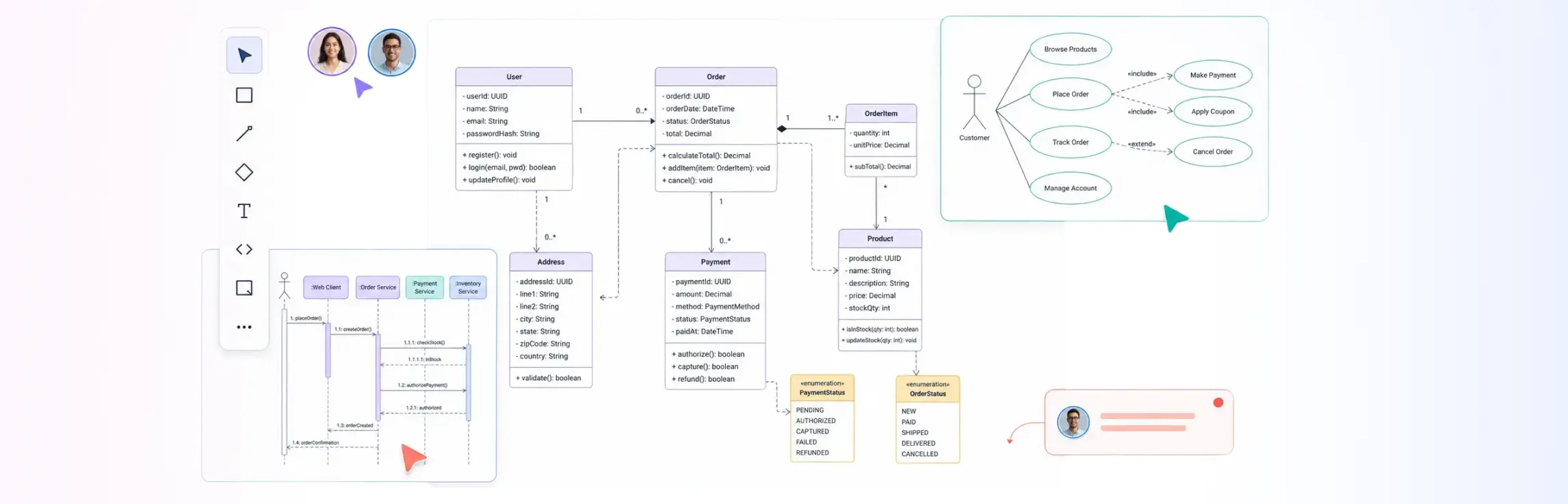
Creately is the best fit in this roundup for software teams that want developers, architects, product managers, and stakeholders to design and review UML in the same visual workspace. Its current UML tool supports standard UML shapes and templates, comments, sharing permissions, version history, notes, links, files, and exports to PDF, PNG, SVG, and JPEG.
That combination matters when a class or sequence diagram is part of a wider decision. A team can keep assumptions, review comments, requirements, and reference material connected to the model instead of scattering them across screenshots and chat threads.
Best for: collaborative system design, architecture reviews, requirements clarification, and visual documentation shared with technical and non-technical reviewers.
Watch for: teams that require every diagram change to be expressed as a text diff may prefer PlantUML or Mermaid.
2. PlantUML: Best for Version-Controlled UML as Code
PlantUML is the strongest choice when diagrams should be maintained as text beside the code they explain. Its official documentation lists support for sequence, use case, class, object, activity, component, deployment, state, and timing diagrams. It can export PNG and SVG, among other formats.
The practical advantage is reviewability. A diagram definition can move through the same branch, pull request, and approval process as a code change. This makes ownership explicit and reduces the chance that an exported image becomes the only surviving source.
Best for: engineering teams comfortable with text syntax, repository-based documentation, automated rendering, and code review.
Watch for: product, operations, and executive reviewers may find a visual editor easier than diagram source. Layout tuning can also take attention away from the model itself.
3. Visual Paradigm: Best for Formal UML and Code Engineering
Visual Paradigm is a better fit for teams that treat UML as an engineering model rather than a presentation artifact. Its product materials describe UML modeling, team collaboration, and code and database engineering capabilities, including round-trip workflows in supported editions.
This depth is useful when architecture governance, model consistency, database design, and generated or synchronized code are part of the same method. It is less compelling when the team only needs occasional sequence and component diagrams for discussion.
Best for: enterprise architects, model-driven development, formal analysis, and teams with established modeling practices.
Watch for: setup, training, and licensing should be evaluated against the small set of modeling functions the team will genuinely use.
4. Lucidchart: Best for General Enterprise Diagramming
Lucidchart combines UML libraries with general business and technical diagramming. Its UML product page documents structural and behavioral diagram support, sequence markup, real-time collaboration, comments, revision history, data linking, layers, and sharing or embedding options.
Choose it when UML is one diagram type among process maps, org charts, cloud diagrams, and other shared visuals. The broad platform can simplify procurement and onboarding for an organization already using Lucid products.
Best for: enterprises that want one familiar diagramming surface across technical and business teams.
Watch for: teams that need a dedicated system-design record or deep model engineering should test those workflows directly rather than infer them from general diagramming features.
5. diagrams.net: Best Free and Offline Visual Option
diagrams.net, also known as draw.io, is a practical choice when cost, local files, and offline access matter most. The official draw.io documentation states that its desktop application works fully offline on Windows, macOS, and Linux. The online editor can synchronize changes through supported cloud storage and repository services.
Its file-based approach is flexible. Teams can decide where diagrams live and can share editable diagram data in formats such as ‘.drawio’, SVG, PNG, PDF, and XML. That flexibility also puts more responsibility on the team to define review, ownership, and version-control conventions.
Best for: individual engineers, security-conscious offline work, and teams willing to govern diagram files themselves.
Watch for: a drawing file is not automatically a maintained architecture record. Establish naming, storage, review, and update rules before adoption.
6. Mermaid: Best for Lightweight Diagrams in Technical Docs
Mermaid is useful when the documentation platform already renders Mermaid syntax. Its official documentation includes sequence, class, state, and other diagram types. Engineers can keep the source in Markdown, review it in a pull request, and render it where the surrounding documentation lives.
Mermaid is not a complete replacement for a formal UML workbench. It is a low-friction way to explain selected interactions and structures without maintaining a separate drawing file.
Best for: README files, developer portals, architecture notes, and documentation-as-code.
Watch for: renderer support and Mermaid versions differ between platforms. Test the target publishing environment before standardizing syntax.
Which UML Tool Should Your Team Choose?
Use the decision below as a starting point.
- Choose Creately when architecture is reviewed collaboratively and the diagram needs connected notes, files, comments, and stakeholder access.
- Choose PlantUML when the diagram source must travel through Git and code review.
- Choose Visual Paradigm when formal modeling, model validation, or code and database engineering drive the decision.
- Choose Lucidchart when UML must fit into a broader enterprise diagramming standard.
- Choose diagrams.net when a free, offline-capable visual editor is the main requirement.
- Choose Mermaid when lightweight diagrams belong directly in Markdown-based technical documentation.
Some teams should use two tools. A visual workspace can support discovery and architecture review, while a code-based diagram records a stable implementation view. If you do this, define which artifact is authoritative and when the second one must be updated.
Copyable UML Tool Evaluation Checklist
Use one real change request for every trial—for example, add an asynchronous payment service to an existing checkout architecture. Then score each candidate from 1 to 5.
Modeling
- Supports the UML diagram types we use today
- Represents the relationships and notation our reviewers expect
- Handles a realistic diagram without unreadable connector routing
- Makes repeated elements, styles, and naming conventions consistent
Editing and maintenance
- A developer can update the model without specialist help
- The tool exposes a clear source of truth
- Changes can be compared, reviewed, or recovered
- Ownership and last-update status are visible
Collaboration and documentation
- Reviewers can comment on a specific model element
- Requirements, ADRs, tickets, files, or notes can be linked
- Sharing permissions match our security requirements
- The latest diagram can be embedded or referenced from our documentation
Delivery and cost
- Exports meet our document and presentation requirements
- The tool works with our repository, wiki, identity provider, and issue tracker
- Offline or self-managed use is available if required
- Total cost includes reviewers, administrators, training, and migration—not only author seats
Record the score and the evidence behind it. A checklist without a trial only measures marketing pages.
Run a 60-Minute UML Tool Trial
- Model the current system. Create a class or component diagram with at least 15 elements and three relationship types.
- Explain behavior. Add a sequence diagram for one successful path and one failure path.
- Make a change. Introduce a new service, interface, or deployment boundary and update both views.
- Request review. Ask one engineer and one non-author to identify an incorrect assumption and leave feedback.
- Publish the result. Put the final model where the team normally finds technical documentation.
- Reopen it a week later. Check whether another person can identify the owner, current version, assumptions, and next update step.
This trial exposes the maintenance cost that polished demos hide.
From UML Diagrams to Living System Design
A UML diagram is valuable when it helps a team make or verify a decision. It loses value when it becomes a static image with no owner or connection to the system.
For architecture teams, the next step is a maintained system-design record: multiple views, architecture decision records, database models, and implementation context kept together and updated as the system evolves. Creately’s direction for System Design builds on that need. The immediate job remains simpler: choose a UML workflow your team will maintain.